While exploring the `vim` crate, I found that `ShellCommand` is
registered twice with identical closure bodies in
`crates/vim/src/command.rs`
[L331-L357](https://github.com/zed-industries/zed/blob/main/crates/vim/src/command.rs#L331-L357)
. This PR removes the redundant code block to clean up.

Self-Review Checklist:

- [x] I've reviewed my own diff for quality, security, and reliability
- [x] Unsafe blocks (if any) have justifying comments
- [x] The content is consistent with the [UI/UX
checklist](https://github.com/zed-industries/zed/blob/main/CONTRIBUTING.md#uiux-checklist)
- [x] Tests cover the new/changed behavior
- [x] Performance impact has been considered and is acceptable

Release Notes:

- N/A

Co-authored-by: dino <dinojoaocosta@gmail.com>
The recent "pickers with previews" overhaul left the picker
sizing/presentation API spread across several overlapping knobs that
every call site had to set correctly — and many didn't, causing pickers
across the app to render at the wrong width, lose their container, or
stop dismissing. This PR consolidates that surface into a small,
hard-to-misuse API and makes correct sizing the default.

Net effect: a plain `Picker::uniform_list(delegate, …)` now renders
correctly out of the box (standard width, standard max-height, shrinks
to fit, dismisses properly), and the ~35 call sites only specify what
genuinely differs.

## API changes

**Presentation** — three overlapping booleans (`is_modal`, `is_popover`,
`is_resizable`) collapsed into one enum, with resizability living inside
the only variant where it's meaningful:

```rust
enum Presentation {
    Modal { resizable: bool }, // own chrome, dismisses on blur, optionally resizable
    Popover,                   // own chrome, dismisses on blur, never resizable
    Embedded,                  // host container owns chrome + dismissal
}
```

- `modal(bool)` is **removed** in favor of explicit, self-documenting
builders:
  - *(default)* → `Modal` (resizable iff it has a preview)
  - `.popover()` → `Popover` (menu-attached surfaces)
  - `.embedded()` → `Embedded` (pickers nested in a larger modal/view)
- Dynamic callers use `.when(cond, Picker::embedded)` (added `impl
FluentBuilder for Picker`).

**Sizing** — preview-vs-not now drives everything; the manual padding
knob is gone:

| Before | After |
|---|---|
| `vertical_padding` field + `no_vertical_padding()` | removed — derived
from whether a preview is visible |
| `height(...)` (ambiguous: fixed vs max) | `max_height(...)` (plain
pickers shrink-to-fit, capped here) |
| `minimum_results_width(...)` | removed — a plain picker's min width
tracks its opening width; preview pickers use standard internal pane
mins |
| default size = 60% viewport | default = `DEFAULT_MODAL_WIDTH` (34rem)
× `DEFAULT_MODAL_MAX_HEIGHT` (24rem, max) |
| resize handles gated on `is_modal` | gated on `is_resizable` (new
`resizable(bool)` builder; auto-`true` for preview pickers) |

Call sites now only override the exceptions: narrow popover selectors
(`initial_width`), the taller outline view (`max_height`), and preview
pickers (constructed via `*_with_preview`).

## Behavior fixes

- **Wrong widths everywhere**: pickers were falling back to
60%-of-viewport because the original migration set
`minimum_results_width` but never `initial_width`. Fixed at the source
via the new defaults.
- **Popovers had no container and wouldn't dismiss**: `is_modal=false`
was suppressing both the elevated background *and* blur-dismiss. Split
out so popovers keep their chrome and dismiss on click-away/escape. This
fixed the agent-panel model/profile selectors, sidebar recent projects,
and the settings theme/font/icon/ollama pickers (which were incorrectly
using `modal(false)`).
- **Sidebar recent projects stretched to full height**: was missing the
shrink-to-fit behavior; now capped and content-sized like other
popovers.
- **Preview crash**: removed an over-strict `debug_assert!` that
panicked when previewing an empty file (`message == None && editor
empty` is valid).
- **Preview-aware default size**: pickers open at standard width with
the preview hidden, and expand to the larger "telescope" size when a
preview is shown. Fixes the text finder rendering super-wide by default,
and makes the file finder expand (rather than cram its results) when you
toggle the preview.

---

Release Notes:

- N/A
Self-Review Checklist:
- [x] I've reviewed my own diff for quality, security, and reliability
- [x] Unsafe blocks (if any) have justifying comments
- [x] The content is consistent with the [UI/UX
checklist](https://github.com/zed-industries/zed/blob/main/CONTRIBUTING.md#uiux-checklist)
- [x] Tests cover the new/changed behavior
- [x] Performance impact has been considered and is acceptable
Closes#52588
Release Notes:
- Fixed insert line above out of an scope
Co-authored-by: Yara 🏳️⚧️ <git@yara.blue>
Overhauls Zed's pickers to make them resizable and give them a preview.
Closes#8279
### Background
The most requested Zed feature has the last year has been a [Telescope
like search box](https://github.com/zed-industries/zed/issues/8279)
[discussion](https://github.com/zed-industries/zed/discussions/22581).
To understand why this is so popular we need to understand search can
serve thee goals:
- Navigation: fuzzy search is faster & easier then clicking in a file
tree
- Exploration: example, find a function by a word in its doc comment
- Collecting: example, getting a list of functions to change
The project search which shows results in a multibuffer is the perfect
way to operate on a list of items. Navigation and Exploration need a lot
of context around each result and offer fast navigation between them.
For both of these live searching is also critical.
The `telescope UI` is a picker with a preview to the right or below.
It's offered in various editors and IDE's most famously Neovim (through
the Telescope plugin), IntelliJ (natively), Helix (natively) and of
course VScode (plugins) and it's _many_ forks.
While having a UI like that for text search (our project search) is most
requested the UX pattern is applied widely, from `find_all_references`
to `bookmarks`. It enhances most pickers. Note that we have over 50
different picker modals!
The community has tried to build something like this for Zed:
- https://github.com/zed-industries/zed/pull/44530
- https://github.com/zed-industries/zed/pull/45307
- https://github.com/zed-industries/zed/pull/46478
- https://github.com/zed-industries/zed/pull/43790
These all became huge PR's that we could not merge for various reasons.
This is a really hard feature to integrate in Zed!
This PR got started as https://github.com/zed-industries/zed/pull/46478
and supercedes that.
### Design
- Extend pickers to support an optional preview with minimal changes to
the pickers themselves.
- Make pickers resizable.
- Complement the existing search do not replace it by having both UI's
share the underlying search and allow freely switching between them.
- Allow extending the preview to things other then files.
- Maintain a clean design on all the pickers.
### Heigh level Implementation overview
- Adds an `Option<Preview>` to `Picker`
- Gives `PickerDelegate` a method to communicate a preview to the Picker
- Overhaul the way pickers are drawn to allow for resizing them.
Implemented on the `Shape` and `SizeBouds` structs.
- Adds a high level way to draw the `footer` and `editor` so we do not
need to change much to the pickers.
- Adds a new text finder Picker
- Adds a way to take a running search from project search and hand it to
the text finder Picker and the other way round
- Give the file finder a preview
### Next steps
A more detailed list and how to help out will be added to the tracking
issue for [Pickes with
previews](https://github.com/zed-industries/zed/issues/56037)
- Add more previews to more pickers!
- Enable selectioning multiple items in pickers and performing actions
on those
- Open selected items in a multibuffer
- Add a way to restore the last picker
- Make popovers (picker attached to some menu) resizable as well
## Self-Review Checklist:
- [x] I've reviewed my own diff for quality, security, and reliability
- [x] Unsafe blocks (if any) have justifying comments
- [x] The content adheres to Zed's UI standards
([UX/UI](https://github.com/zed-industries/zed/blob/main/CONTRIBUTING.md#uiux-checklist)
and
[icon](https://github.com/zed-industries/zed/blob/main/crates/icons/README.md)
guidelines)
- [x] Tests cover the new/changed behavior
- [x] Performance impact has been considered and is acceptable
## Showcase
TODO (will be done post merge)
---
Release Notes:
- Added resizing via dragging to all picker modals.
- Added a preview to the File finder, the preview can be to the right or
below.
- Added a Text finder picker with a preview as alternative project
search UI. The search is shared and allowes switch between UIs while
running.
---------
Co-authored-by: ozacod <47009516+ozacod@users.noreply.github.com>
Co-authored-by: ozacod <ozacod@users.noreply.github.com>
Co-authored-by: Danilo Leal <daniloleal09@gmail.com>
# Objective
- This PR fixed the `gg` and `ge` motion in Helix mode to match the
behavoir from Helix. Fixes#56702
## Solution
- The solution is to add custom handling for the StartOfDocument and
EndOfDocument Motions in normal and select mode. For both cases, column
0 is hard coded in the DisplayPoint for the destination of the motion.
## Testing
- Did you test these changes? If so, how?
Yes, I added unit tests which pass and also manually tested the `gg` and
`ge` motions in the new build.
- Are there any parts that need more testing?
- How can other people (reviewers) test your changes? Is there anything
specific they need to know?
1. Enable Helix mode in the settings
2. Open a file with multiple lines
3. Move to the middle of the file
4. Press `gg` and `ge`
5. Cursor should move to start or end of file at column 0
6. Same for Select mode
- If relevant, what platforms did you test these changes on, and are
there any important ones you can't test?
I only tested on Linux (Fedora). Since the changes are not platform
specific, I don't think more testing is necessary, but always welcome.
## Self-Review Checklist:
- [x] I've reviewed my own diff for quality, security, and reliability
- [x] Unsafe blocks (if any) have justifying comments
- [x] The content adheres to Zed's UI standards
([UX/UI](https://github.com/zed-industries/zed/blob/main/CONTRIBUTING.md#uiux-checklist)
and
[icon](https://github.com/zed-industries/zed/blob/main/crates/icons/README.md)
guidelines)
- [x] Tests cover the new/changed behavior
- [x] Performance impact has been considered and is acceptable
Release Notes:
- Fixed `gg` and `ge` motions to jump to the first character on the line
and match Helix exactly.
---------
Co-authored-by: dino <dinojoaocosta@gmail.com>
In vim, `c {count} w` diverges from the default `w` motion behavior: For
change operations, the `w` motion will be treated like the `e` motion if
the cursor is on a word, preserving whitespace after the N-th word. In
zed, this special case was only implemented for a count of 1, falling
back to incorrectly using the `w` motion if the count is greater than 1.
This PR generalizes this implementation to handle this special case for
any count.
Self-Review Checklist:
- [x] I've reviewed my own diff for quality, security, and reliability
- [x] Unsafe blocks (if any) have justifying comments
- [x] The content is consistent with the [UI/UX
checklist](https://github.com/zed-industries/zed/blob/main/CONTRIBUTING.md#uiux-checklist)
- [x] Tests cover the new/changed behavior
- [x] Performance impact has been considered and is acceptable
Closes#56563.
Release Notes:
- Fixed: vim `cw` with count greater than 1 not preserving whitespace
correctly
---------
Co-authored-by: dino <dinojoaocosta@gmail.com>
# Objective
Fixes#58736
Pause the debugger on a breakpoint, switch your theme, and the active
debug line keeps its old highlight color until you step again or restart
Zed.
## Solution
The highlight stores a concrete color grabbed from the theme back when
`go_to_active_debug_line` ran. A theme switch goes through
`theme_changed`, which refreshes brackets, semantic tokens, and outline
symbols but never re-applies that highlight, so it stays stale.
Re-running `go_to_active_debug_line` from `theme_changed` re-resolves
the color against the current theme.
## Testing
Added a regression test in `debugger_ui` that stops at a debug line,
swaps the theme's `editor.debugger_active_line.background`, and checks
the highlight follows. It fails on `main` and passes with the fix.
Also tested by hand on Windows: started a debugpy session, paused at a
breakpoint, switched themes from the theme selector, and watched the
active line recolor live without stepping or restarting.
## Self-Review Checklist:
- [x] I've reviewed my own diff for quality, security, and reliability
- [x] Unsafe blocks (if any) have justifying comments
- [ ] The content adheres to Zed's UI standards
([UX/UI](https://github.com/zed-industries/zed/blob/main/CONTRIBUTING.md#uiux-checklist)
and
[icon](https://github.com/zed-industries/zed/blob/main/crates/icons/README.md)
guidelines)
- [x] Tests cover the new/changed behavior
- [x] Performance impact has been considered and is acceptable
## Showcase
Paused at a breakpoint, switching themes from the theme selector.
| Before | After |
| --- | --- |
|
https://github.com/user-attachments/assets/653a7e1b-3a99-4316-b1c9-b16ed7a7a8ba
|
https://github.com/user-attachments/assets/22a4c876-30f2-44c5-aad9-0f860639074c
|
---
Release Notes:
- Fixed the active debug line color not updating when switching themes
while the debugger is paused
([#58736](https://github.com/zed-industries/zed/issues/58736)).
---------
Co-authored-by: dino <dinojoaocosta@gmail.com>
The work introduced in https://github.com/zed-industries/zed/pull/54496
updated the `command_aliases` schema, adding support for auto-completion
action names when editing the settings file. However, it didn't take
into consideration the case where the user is simply creating an alias
to an arbitrary string.

These changes introduce a new `CommandAliasTarget` newtype for which the
json schema is either a registered action name, from `ActionName` or any
arbitrary string, as those are supported by the `command_aliases`
setting.

Updating the `ActionName` schema to accept any arbitrary string would
break the guarantees we have on the keymap binding schema, so that's why
a new schema was introduced.

Lastly, trying to set `CommandAliasTarget::json_schema` to a simply
`anyOf` with either the registered action name or a string that is not a
registered action name, like shown below, broke deprecation warnings,
hence why we're still doing the approach of only building
`CommandAliasTarget` at runtime.

```json
{
    "anyOf": [
        { "$ref": "#/$defs/ActionName" },
        { "type": "string", "not": {
            "$ref": "#/$defs/ActionName"
        }},
    ]
}
```

Self-Review Checklist:

- [x] I've reviewed my own diff for quality, security, and reliability
- [x] Unsafe blocks (if any) have justifying comments
- [x] The content is consistent with the [UI/UX
checklist](https://github.com/zed-industries/zed/blob/main/CONTRIBUTING.md#uiux-checklist)
- [x] Tests cover the new/changed behavior
- [x] Performance impact has been considered and is acceptable

Release Notes:

- Fixed validation of `command_aliases` setting to avoid showing
warnings when aliasing to an arbitrary string
Closes#55170
Fixes Helix mode undo selection history after `d` deletes the character
under an empty cursor. Previously, `d` temporarily expanded the cursor
to a one-character selection before deleting, and undo restored that
temporary selection. When the deleted character was a newline, pressing
`x` after undo selected additional line which was wrong.
This preserves the original Helix selection as the undo-restored
selection while keeping the existing delete behavior unchanged.
Self-Review Checklist:
- [x] I've reviewed my own diff for quality, security, and reliability
- [x] Unsafe blocks (if any) have justifying comments
- [x] The content is consistent with the [UI/UX
checklist](https://github.com/zed-industries/zed/blob/main/CONTRIBUTING.md#uiux-checklist)
- [x] Tests cover the new/changed behavior
- [x] Performance impact has been considered and is acceptable
Release Notes:
- Fixed Helix mode selecting one extra line after undoing a newline
delete
Co-authored-by: Tom Houlé <13155277+tomhoule@users.noreply.github.com>
Self-Review Checklist:

- [x] I've reviewed my own diff for quality, security, and reliability
- [x] Unsafe blocks (if any) have justifying comments
- [x] The content is consistent with the [UI/UX
checklist](https://github.com/zed-industries/zed/blob/main/CONTRIBUTING.md#uiux-checklist)
- [x] Tests cover the new/changed behavior
- [x] Performance impact has been considered and is acceptable

Closes #ISSUE

Release Notes:

- N/A or Added/Fixed/Improved ...
Finally continuing from PR #35200:
I adapted the fix to the changed find_target() logic and added more
tests for version strings like `0.82.46`.
This is a different but similar fix compared to #47356 for helix mode -
not sure if this can and should be unified?
Self-Review Checklist:
- [x] I've reviewed my own diff for quality, security, and reliability
- [x] Unsafe blocks (if any) have justifying comments
- [x] The content is consistent with the [UI/UX
checklist](https://github.com/zed-industries/zed/blob/main/CONTRIBUTING.md#uiux-checklist)
(should not affect UI at all)
- [x] Tests cover the new/changed behavior
- [x] Performance impact has been considered and is acceptable
Closes#35193
Release Notes:
- Fixed vim's increment (`ctrl-a`) and decrement (`ctrl-x`) commands
skipping the number under the cursor in dotted strings like version
numbers (e.g. `0.81.46`) and hyphened date strings (e.g. `2015-02-01`)
---------
Co-authored-by: Stefan Bethge <kjyv@users.noreply.github.com>
Co-authored-by: Conrad Irwin <conrad.irwin@gmail.com>
Co-authored-by: dino <dinojoaocosta@gmail.com>
Closes [#58343](<https://github.com/zed-industries/zed/issues/58343>)

This crash happened because Helix paste restored selection using the raw
clipboard text length, but buffer edits normalize CRLF line endings to
LF before inserting. When pasting CRLF text at or near EOF, the restored
selection could extend past the normalized snapshot length and panic in
`MutableSelectionsCollection::select_ranges`. The fix normalizes the
text before measuring it for selection restoration and adds regression
coverage for CRLF paste in Helix mode.

Self-Review Checklist:

- [X] I've reviewed my own diff for quality, security, and reliability
- [X] Unsafe blocks (if any) have justifying comments
- [X] The content is consistent with the [UI/UX
checklist](<https://github.com/zed-industries/zed/blob/main/CONTRIBUTING.md#uiux-checklist>)
- [X] Tests cover the new/changed behavior
- [X] Performance impact has been considered and is acceptable

Release Notes:

- Fixed a crash that could occur when pasting at the end of a file in
Helix mode
Self-Review Checklist:

- [x] I've reviewed my own diff for quality, security, and reliability
- [x] Unsafe blocks (if any) have justifying comments
- [x] The content is consistent with the [UI/UX
checklist](https://github.com/zed-industries/zed/blob/main/CONTRIBUTING.md#uiux-checklist)
- [x] Tests cover the new/changed behavior
- [x] Performance impact has been considered and is acceptable


Release Notes:

- N/A
Self-Review Checklist:
- [x] I've reviewed my own diff for quality, security, and reliability
- [x] Unsafe blocks (if any) have justifying comments
- [x] The content is consistent with the [UI/UX
checklist](https://github.com/zed-industries/zed/blob/main/CONTRIBUTING.md#uiux-checklist)
- [x] Tests cover the new/changed behavior
- [x] Performance impact has been considered and is acceptable
Closes#54209
Release Notes:
- Fixed vim `%` (matching bracket) motion not working in multibuffers
---------
Co-authored-by: Cole Miller <cole@zed.dev>
Co-authored-by: zed-zippy[bot] <234243425+zed-zippy[bot]@users.noreply.github.com>
Closes#56493
In Helix select mode, pressing `a` after a selection (e.g. `v a`) placed
the cursor one column too far to the right.
Bound `a` to `vim::HelixAppend` in the `helix_select` keymap so it
matches the behavior in `helix_normal`, and added a regression test for
the `v a` case.
Release Notes:
- Fixed cursor placement after pressing `a` in Helix select mode.
---------
Co-authored-by: Smit Barmase <heysmitbarmase@gmail.com>
Closes#47251
Fix dot (`.`) repeat not correctly repeating the last change after
replaying a macro (`@register`)
([#47251](https://github.com/zed-industries/zed/issues/47251))
When replaying a macro that contains text insertions,
`replay_insert_event` calls `handle_input` directly and never emits
`InputHandled`, so the `observe_insertion` subscription never fires.
This left the dot register stale — `.` after `@register` would repeat an
earlier change instead of the last one made by the macro.
Fix by calling `observe_insertion` explicitly in the
`ReplayableAction::Insertion` branch of `Replayer::next`.
Release Notes:
- Fixed dot (`.`) repeat not repeating the last change made by a macro
(`@register`).
---------
Co-authored-by: Smit Barmase <heysmitbarmase@gmail.com>
Resolves https://github.com/zed-industries/zed/issues/57522

This diff fixes `r` in Helix select mode. The keybinding already pushed
the replace operator in `helix_select`, but when the replacement
character was typed, the operator dispatch only handled `HelixNormal`,
so selected text in `HelixSelect` fell through and cleared the operator
without editing the buffer.

With this change, Helix select mode uses the same `helix_replace` path
as Helix normal mode. Multi-character selections now replace each
selected grapheme with the typed character and return to Helix normal
mode, matching the existing behaviour for Helix normal selections.

Release Notes:
- Fixed `r` not replacing multi-character selections in Helix select
mode.
Resolves https://github.com/zed-industries/zed/issues/57486

This diff fixes `g w` after selecting lines with `x` in Helix mode. `x`
leaves Zed in Helix normal mode with a non-empty selection, but jump
target collection treated non-visual selections as ranges to skip. As a
result, words on the selected line did not receive jump labels.

With this change, Helix normal mode keeps existing selection ranges
eligible for jump targets, matching Helix's behavior where normal mode
can still carry selections. The regression covers `x` followed by `g w`
targeting a word inside the selected line.

Release Notes:

- Fixed `g w` not targeting words on lines selected with `x` in Helix
mode.

---------

Co-authored-by: Smit Barmase <heysmitbarmase@gmail.com>
The cmd_f_search flag introduced in #51073 was never cleared when
switching to vim-style search commands, causing collapse_matches to
remain false and match ranges to appear as visual selections.
Reset cmd_f_search when n/N or */# are used, restore Normal mode if
Visual was entered due to the non-collapsed selection, and fix an early
return in visual select_match that leaked collapse_matches.
Fixes#53896
Self-Review Checklist:
- [ ] I've reviewed my own diff for quality, security, and reliability
- [ ] Unsafe blocks (if any) have justifying comments
- [ ] The content is consistent with the [UI/UX
checklist](https://github.com/zed-industries/zed/blob/main/CONTRIBUTING.md#uiux-checklist)
- [ ] Tests cover the new/changed behavior
- [ ] Performance impact has been considered and is acceptable
Closes #ISSUE
Release Notes:
- N/A or Added/Fixed/Improved ...
Co-authored-by: Conrad Irwin <conrad.irwin@gmail.com>
Self-Review Checklist:

- [x] I've reviewed my own diff for quality, security, and reliability
- [x] Unsafe blocks (if any) have justifying comments
- [x] The content is consistent with the [UI/UX
checklist](https://github.com/zed-industries/zed/blob/main/CONTRIBUTING.md#uiux-checklist)
- [x] Tests cover the new/changed behavior
- [x] Performance impact has been considered and is acceptable

## Summary
Prevent undo grouping when an LSP completion includes extra edits so
that the completion and its extra edits are applied and reverted
atomically.

## Problem
When applying an LSP completion that also applies extra edits, the
editor may merge that completion into the surrounding undo group or
split the transaction while waiting for edits, causing undo to leave the
buffer in an inconsistent state.

## Solution
* Always block undo merging for completions

Closes #ISSUE

Release Notes:

- Prevent undo grouping when any LSP completion
Closes#55619
### Summary
- Route `buffer_search::UseSelectionForFind` through
`BufferSearchBar::deploy` instead of updating the query editor directly.
- Add an explicit seed-query override to `deploy`, so the Cmd-E action
can force `SeedQuerySetting::Always` while regular deploy callers
continue to pass `None` and respect the user’s
`seed_search_query_from_cursor` setting.
- By going through `deploy`, Cmd-E now also runs the search path that
keeps buffer-search navigation state in sync:
- shows/initializes the search bar for the active searchable item
- applies the seeded query via `search_suggested`
- calls `search`, which updates the query editor, search options, active
search query, search history, and macOS find pasteboard
- refreshes `searchable_items_with_matches` and `active_match_index`
- activates the current match after the search completes
- This ensures the subsequent Cmd-G action has the expected active
query, match list, search token, and active match index to select the
next result.
- Add a macOS-only end-to-end regression test using the default macOS
keymap with `simulate_keystrokes("cmd-e")` and
`simulate_keystrokes("cmd-g")`.
### Validation
- `cargo test -p search test_cmd_e_then_cmd_g_uses_selection_for_find`
- `cargo fmt --check --package search --package zed_actions`
- `./script/check-keymaps`
- `cargo check -p search`
- `cargo check -p workspace`
- `cargo check -p vim`
Release Notes:
- Fixed macOS Cmd-E/Cmd-G find behavior so Cmd-E seeds find from the
cursor or selection and Cmd-G advances through the newly seeded matches.
Closes#55481
Adds Vim-mode access to the existing Helix jump-to-word overlay via `g
z`. We use `g z` because it is currently unassigned in Vim mode, while
`g w` is already used for rewrap.
Most of the implementation lives in `helix.rs` because the existing jump
overlay, label generation, and Helix/Vim modal behavior are currently
intertwined there. This keeps the change small and reuses the existing
navigation overlay logic instead of doing a broader refactor.
In Vim normal mode, jump labels behave like a cursor motion: selecting a
label moves the cursor to the start of the target word without selecting
it. In Vim visual mode, jump labels extend the selection like a Vim
word-start motion, preserving Vim’s inclusive visual-selection behavior.
Self-Review Checklist:
- [x] I've reviewed my own diff for quality, security, and reliability
- [x] Unsafe blocks (if any) have justifying comments
- [x] The content is consistent with the [UI/UX
checklist](https://github.com/zed-industries/zed/blob/main/CONTRIBUTING.md#uiux-checklist)
- [x] Tests cover the new/changed behavior
- [x] Performance impact has been considered and is acceptable
Release Notes:
- Added Vim-mode jump-to-word navigation on `g z`.
Part of #48241 (`dsq` still needs to be implemented, I can try to do in
another PR if+when this is merged)

AnyBrackets was already supported, and these various surrounds were
supported with other vim motions, this just brings parity for "change
surrounds".

Also adds MiniBrackets support since it works the same way as MiniQuotes
does.

Most of this change is just test cases for vim edits with `csq` + `csb`,
using the keybinds described in the docs:
https://zed.dev/docs/vim#any-bracket-functionality

Also did a slight refactor to reuse some constants for supported pairs,
for consistency.


Before you mark this PR as ready for review, make sure that you have:
- [x] Added a solid test coverage and/or screenshots from doing manual
testing
- [x] Done a self-review taking into account security and performance
aspects
- [x] Aligned any UI changes with the [UI
checklist](https://github.com/zed-industries/zed/blob/main/CONTRIBUTING.md#uiux-checklist)

Release Notes:

- Fixed vim `change surrounds` for MiniQuotes, MiniBrackets, and
AnyQuotes
Self-Review Checklist:

- [x] I've reviewed my own diff for quality, security, and reliability
- [x] Unsafe blocks (if any) have justifying comments
- [x] The content is consistent with the [UI/UX
checklist](https://github.com/zed-industries/zed/blob/main/CONTRIBUTING.md#uiux-checklist)
- [x] Tests cover the new/changed behavior
- [x] Performance impact has been considered and is acceptable

Closes #ISSUE

Release Notes:

- Added a setting
[vim.show_edit_predictions_in_normal_mode](zed://settings/vim.show_edit_predictions_in_normal_mode)
to control whether edit predictions are shown in normal mode.
Closes#24820
This PR fixes the bug specified in issue
https://github.com/zed-industries/zed/issues/24820, now the matching
function checks if the cursor is above a comment or a directive before
defaulting to a bracket range as neovim does.
It also fixes fixes the `line_end` calculations so that when `%` is
pressed inside a bracket range
https://github.com/user-attachments/assets/f59daa6f-9769-45e8-bb8c-2d533470b59d
Release Notes:
- `fn matching()` checks for `preprocessor directives` or `comments`
before defaulting to any bracket range.
- In `fn matching()`line_end calculations avoid expanding a blank
current line into start..EOF.
cc @SomeoneToIgnore

## Summary

Follow-up to https://github.com/zed-industries/zed/discussions/55352,
where the conclusion was to split `editor.rs` incrementally by topic
instead of all at once.

This mechanically extracts editor config and reflow-related code into
`crates/editor/src/config.rs` and `crates/editor/src/rewrap.rs`, while
preserving existing behavior and keeping externally-used APIs public
where needed.

Self-Review Checklist:

- [x] I've reviewed my own diff for quality, security, and reliability
- [x] Unsafe blocks (if any) have justifying comments
- [x] The content is consistent with the [UI/UX
checklist](https://github.com/zed-industries/zed/blob/main/CONTRIBUTING.md#uiux-checklist)
- [x] Tests cover the new/changed behavior
- [x] Performance impact has been considered and is acceptable

Release Notes:

- N/A
Fixes a panic at `Editor::text_layout_details` when called against an
editor whose element has never been laid out (i.e., `set_style` has
never been called, so the cached `style` is still `None`).

We've seen this crash once through a helix motion. The exact production
sequence isn't clear — for the editor to receive a vim action without
ever having been drawn, the active item would have to have changed
inside the same update tick that ends with the deferred `search_submit`,
which is narrow but not impossible (since it's dispatched by the
workspace, not the editor).

Release Notes:

- Fixed a rare panic when invoking helix motions on an editor that had
not yet been laid out.
Instead of manually handing hiding the cursor on keyboard input at the
editor level, GPUI will now take care of it.

This makes it significantly easier to handle the edge cases, and allows
delegating the cursor restoration to the platform itself in the macOS
case. On Linux and Windows, we still have to restore the cursor on
movement ourselves, but this now happens at the platform-specific level.

Bugs fixed by this change:
- No cursor when "Unsaved edits" prompt appears
- Cursor disappears when clicking a panel button if it contains a search
bar (e.g. collab panel)

### Setting rename

The `hide_mouse` setting value `"on_typing_and_movement"` has been
renamed to `"on_typing_and_action"` to better reflect what it actually
does — it hides the cursor when a keystroke resolves to an action (e.g.
cursor movement, deletion). Existing settings are migrated
automatically.

### Tested platforms
- [x] macOS
- [x] Wayland
- [x] X11
- [x] Windows
- [x] Web

Self-Review Checklist:

- [x] I've reviewed my own diff for quality, security, and reliability
- [x] Unsafe blocks (if any) have justifying comments
- [x] The content is consistent with the [UI/UX
checklist](https://github.com/zed-industries/zed/blob/main/CONTRIBUTING.md#uiux-checklist)
- [ ] Tests cover the new/changed behavior
- [x] Performance impact has been considered and is acceptable

Release Notes:

- Renamed the `hide_mouse` setting value `on_typing_and_movement` to
`on_typing_and_action` to better describe its behavior (existing
settings are auto-migrated)
- Fixed a few situations where the mouse cursor would be incorrectly
hidden
Self-Review Checklist:

- [x] I've reviewed my own diff for quality, security, and reliability
- [x] Unsafe blocks (if any) have justifying comments
- [x] The content is consistent with the [UI/UX
checklist](https://github.com/zed-industries/zed/blob/main/CONTRIBUTING.md#uiux-checklist)
- [x] Tests cover the new/changed behavior
- [x] Performance impact has been considered and is acceptable

Closes #ISSUE

Release Notes:

- N/A
Self-Review Checklist:

- [x] I've reviewed my own diff for quality, security, and reliability
- [x] Unsafe blocks (if any) have justifying comments
- [x] The content is consistent with the [UI/UX
checklist](https://github.com/zed-industries/zed/blob/main/CONTRIBUTING.md#uiux-checklist)
- [x] Tests cover the new/changed behavior
- [x] Performance impact has been considered and is acceptable

Closes ##42292

The text inserted in the search ('\$SEARCH') and replace ('$$OTHER')
inputs of the top-panel is a little anti-aesthetic, but that seems out
of scope for this issue.

Release Notes:

- '$' in the second clause of vim-style '%s/find/replace/g' actions is
correctly escaped.

Co-authored-by: Conrad Irwin <conrad.irwin@gmail.com>
No, sadly, the title is not a typo. See
https://www.githubstatus.com/incidents/zsg1lk7w13cf for the context.
I'll read with joy and popcorn through that root cause analysis.

It makes literally zero sense what happened here, but for some completly
bonkers reason GitHub completely messed up the merge queue with
https://github.com/zed-industries/zed/pull/54632.

I have no idea how it happened. It makes literally zero sense. A PR
going into the merge queue should have the same LoC when getting out of
it. GitHub obviously does not check this. GitHub causes extra work with
a feature that is supposed to save time.

Thanks, I guess.

Release Notes:

- N/A

---------

Co-authored-by: Danilo Leal <daniloleal09@gmail.com>
Closes#47155, introduced by #44317
I naively trusted `crates/vim/src/object.rs:1624`'s
`surrounding_markers` to check whether the cursor is actually
surrounded, but it has nearest match fallback behavior, apparently by
design as indicated by `test_anyquotes_object` in the same file.
Release Notes:
- Fixed Helix surround operations falling back to closest match if
cursor not surrounded
Co-authored-by: Jakub Konka <kubkon@jakubkonka.com>
This PR brings back the button to filter remote branches when accessing
the title bar's branch picker with the mouse. It was unintentionally
removed when we introduced the new worktree picker.

Release Notes:

- N/A
# Helix Amp Jump Navigation
## Overview
Implements Helix-style "amp jump" (`g w`) navigation for jump-to-word
functionality. This feature displays two-character labels on each word
in the visible area, allowing users to quickly jump to any word by
typing its label. Labels alternate between forward and backward
directions (same algorithm as in the Helix) from the cursor position,
giving closer jump targets easier-to-type labels.
## Context
- **Request:** Implement "amp jump" navigation similar to Helix editor's
jump-to-word feature.
- **Scope:** Full implementation including label generation, UI
rendering, and input handling.
- **Inspiration:** Helix editor's "amp jump" and vim-easymotion/hop.nvim
plugins.
## How It Works
1. Press `g w` to activate "amp jump"
2. Two-character labels appear on all words in visible area
3. User types the two-character label shown on the target word
4. Cursor jumps to that word
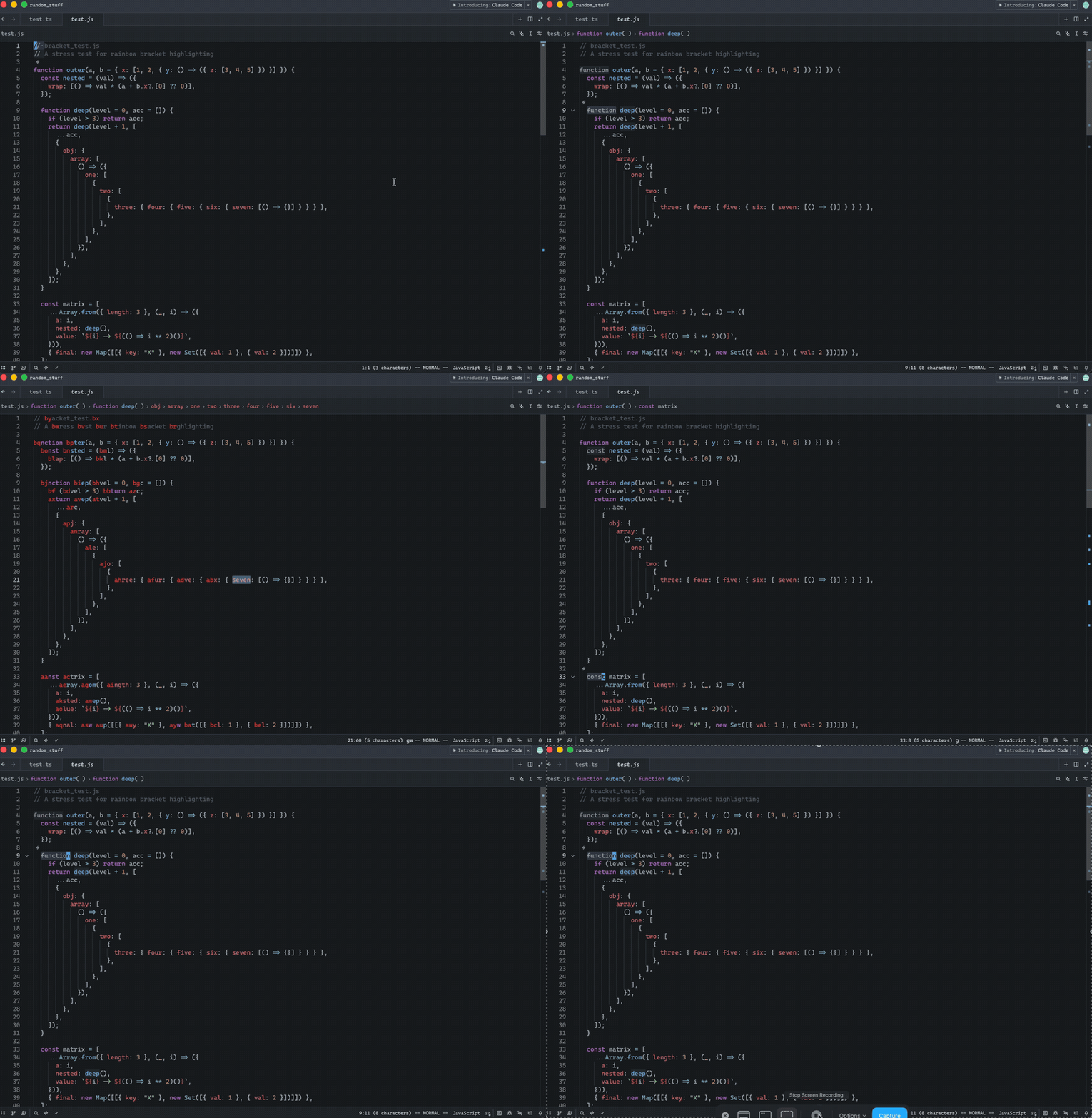
Release Notes:
- Added in Helix mode the "amp jump" navigation (`g w`) that displays
two-character labels on words for quick cursor navigation. Labels
alternate between forward and backward directions from the cursor,
prioritizing closer targets with easier-to-type labels. The color of the
labels can be controlled via a new `helix.jump_label_accent` setting
---------
Co-authored-by: Jakub Konka <kubkon@jakubkonka.com>
## Summary
Closes#53570
- `o` and `O` in normal mode were unconditionally copying the current
line's indentation into the new line, ignoring the `auto_indent` setting
entirely
- When `auto_indent: "none"` is set, new lines created by `o`/`O` now
start at column 0 as expected
- When `auto_indent` is `preserve_indent` or `syntax_aware`, behavior is
unchanged
The fix reads `language_settings_at` for the relevant row and splits
edits into two paths: `editor.edit()` (no autoindent) for `None`, and
`editor.edit_with_autoindent()` for everything else — mirroring the
approach already used by the non-vim `Newline` action.
## Test plan
- Added `test_o_auto_indent_none`: verifies `o`/`O` produce column-0
lines with `auto_indent: "none"`, including edge cases (first line,
empty line)
- Added `test_o_preserve_indent`: verifies `o`/`O` copy the current
line's indentation with `auto_indent: "preserve_indent"` (regression
guard)
- Existing neovim-backed tests (`test_o`, `test_insert_line_above`,
`test_o_comment`) continue to pass
Release Notes:
- Fixed vim `o`/`O` commands ignoring the `auto_indent: "none"` setting,
causing new lines to inherit indentation instead of starting at column 0
Update the JSON schema generated for the settings file in order to be
able to provide the list of valid actions when editing the values for
the `command_aliases` setting.

While reviewing https://github.com/zed-industries/zed/pull/52892 , I
noticed that, even though we already have support for this in the keymap
file, we don't support it for the `command_aliases` setting, so went
ahead and refactored this a bit such that the existing functionality for
the keymap file JSON schema could also be re-used for the
`command_aliases` setting.

Here's a quick big-picture breakdown of the relevant changes:

* Add `settings_content::ActionName` newtype, representing a simple
named action without arguments. The
`settings_content::ActionName::build_schema` function can be used to
build the schema of all possible action names.
* Add `settings_content::ActionWithArguments` newtype, representing an
action with arguments. This was mostly done so as to keep both action
without arguments and action with arguments newtypes together,
even though we don't have
`settings_content::ActionWithArguments::build_schema`, as it is only
used by the keymap schema generation logic and probably doesn't warrant
moving it here right now.
* Update both
`settings_content::WorkspaceSettingsContent::command_aliases` and
`workspace::workspace_settings::WorkspaceSettings::command_aliases` to
now be of type `HashMap<String, ActionName>` such that, when the json
schema for `command_aliases` is generate, it'll now reference the
`#/$defs/ActionName` schema.
* Update `SettingsStore::json_schema` so as to populate the
`#/$defs/ActionName` schema at runtime, replacing it with the actual
list of valid action names.

Self-Review Checklist:

- [x] I've reviewed my own diff for quality, security, and reliability
- [x] Unsafe blocks (if any) have justifying comments
- [x] The content is consistent with the [UI/UX
checklist](https://github.com/zed-industries/zed/blob/main/CONTRIBUTING.md#uiux-checklist)
- [x] Tests cover the new/changed behavior
- [x] Performance impact has been considered and is acceptable

Release Notes:

- Added support for auto-completing action names on `command_aliases`
setting
Release Notes:

- Fixed Helix vgl now correctly selects to end of line without
including the newline character in the selection.

---------

Co-authored-by: Jakub Konka <kubkon@jakubkonka.com>
Self-Review Checklist:
- [x] I've reviewed my own diff for quality, security, and reliability
- [ ] Unsafe blocks (if any) have justifying comments
- [x] The content is consistent with the UI/UX checklist
- [x] Tests cover the new/changed behavior
- [x] Performance impact has been considered and is acceptable
Closes#52352
Release Notes:
- Fixed system clipboard being overwritten when pasting over a visual
selection with Cmd-V/Ctrl-V in vim mode
Closes#46551
Zed was using the `terminal.shell` setting for some actions unrelated to
the terminal GUI, like environment capture, ACP agent startup, context
server startup, and vim `:!`, and so if a user set it to `tmux` or
`nushell`, those paths would fail.
This PR ensures paths unrelated to Zed's terminal use the system path
instead.
Manual testing:
Set `terminal.shell` to `tmux` or any another non-bash executable.
Starting an external agent thread shouldn't break.
Release Notes:
- Fixed ACP agent and other breakage when `terminal.shell` was set to a
non-shell program like `tmux`
We had an internal report of soft wrap not working in git panel's commit
editor. Given the following settings:
```json
{
  "languages": {
    "Git Commit": {
      "preferred_line_length": 80,
      "soft_wrap": "preferred_line_length",
    },
  },
}
```
We would not soft-wrap in narrow viewports. As it turned out, the
problem was that we were always prefering a `preferred_line_length` as
our soft wrap boundary over the actual width of the editor.

Self-Review Checklist:

- [x] I've reviewed my own diff for quality, security, and reliability
- [x] Unsafe blocks (if any) have justifying comments
- [ ] The content is consistent with the [UI/UX
checklist](https://github.com/zed-industries/zed/blob/main/CONTRIBUTING.md#uiux-checklist)
- [ ] Tests cover the new/changed behavior
- [x] Performance impact has been considered and is acceptable

Closes #ISSUE

Release Notes:

- Fixed git commits editor not respecting soft wrap boundaries.
- settings: Removed `"soft_wrap": "preferred_line_length"` in favour of
`"soft_wrap": "bounded"`. Soft wrap now always respects editor width
when it's enabled.
## Context
Closes#46698
This PR fixes a bug where the `cs` (change surrounds) operator fails on
symmetric delimiters like quotes.
In a sequence like `c s ' "`, Zed previously performed two independent
searches. For a line like `I'm 'goˇod'`, the first step (`cs'`)
correctly moves the cursor to the second quote: `I'm ˇ'good'`. However,
when the replacement character `"` is pressed, `change_surrounds` would
perform another scan from the new cursor position. Because quotes are
symmetric, this second search would incorrectly match `'m '` as the
target pair, leading to a broken result like `I"m "good'`.
I've refactored the workflow to ensure the search happens only once.
`prepare_and_move_to_valid_bracket_pair` now computes and stores the
`Anchor` positions of the detected pair directly into the operator
state. `change_surrounds` then simply reuses these anchors instead of
re-executing the search. This ensures correctness for quotes while
remaining consistent with Vim/Neovim cursor behavior. While this
slightly increases coupling between these two functions, it is an
intentional trade-off since they exclusively serve the `cs` operation.
## How to Review
The main changes are in `crates/vim/src/surrounds.rs`. I renamed
`check_and_move_to_valid_bracket_pair` to
`prepare_and_move_to_valid_bracket_pair` and updated it to return the
detected bracket anchors. In `change_surrounds`, I removed the redundant
search logic and updated it to perform the replacement using the
provided anchors. You can also see the updated
`Operator::ChangeSurrounds` enum variant in `crates/vim/src/state.rs`
which now carries the anchor data.
## Self-Review Checklist
<!-- Check before requesting review: -->
- [x] I've reviewed my own diff for quality, security, and reliability
- [x] Unsafe blocks (if any) have justifying comments
- [x] The content is consistent with the [UI/UX
checklist](https://github.com/zed-industries/zed/blob/main/CONTRIBUTING.md#uiux-checklist)
- [x] Tests cover the new/changed behavior
- [x] Performance impact has been considered and is acceptable
Release Notes:
- Fixed an issue where the `cs` Vim operator incorrectly identified
symmetric quotes in certain contexts.
---------
Co-authored-by: Conrad Irwin <conrad.irwin@gmail.com>
When the Agent panel (or any dock panel without its own pane) is focused
and a file is open in the center editor, pressing `/` in vim mode would
steal focus to the buffer's search bar instead of staying on the panel.

## Root cause

`Vim::pane()` calls `workspace.focused_pane()`, which falls back to the
center pane when a dock panel without its own `pane()` method is
focused. Vim search commands then open the `BufferSearchBar` on the
center pane and focus it, stealing focus from the panel.

## Fix

Add a guard in `Vim::pane()` that returns `None` when the resolved pane
doesn't actually contain focus. This prevents all vim search/match
commands (`/`, `?`, `n`, `N`, `*`, `#`, etc.) from stealing focus from
non-pane panels.

All 497 vim tests and 253 agent_ui tests pass.

Release Notes:

- Fixed vim search (`/`) stealing focus from the Agent panel when a file
is open in the editor.
Closes#4751
## Testing
- Manually tested by comparing the behaviors with vscode.
- Those requirements are added to unit tests.
Release Notes:
- Added action to toggle block comments
---------
Co-authored-by: ozacod <ozacod@users.noreply.github.com>
After chat functionality was removed, this panel became redundant. It
only displayed three notification types: incoming contact requests,
accepted contact requests, and channel invitations.

This PR moves those notifications into the collab experience by adding
toast popups and a badge count to the collab panel. It also removes the
notification-panel-specific settings, documentation, and Vim command.

Before you mark this PR as ready for review, make sure that you have:
- [ ] Added a solid test coverage and/or screenshots from doing manual
testing
- [x] Done a self-review taking into account security and performance
aspects
- [x] Aligned any UI changes with the [UI
checklist](https://github.com/zed-industries/zed/blob/main/CONTRIBUTING.md#uiux-checklist)

Release Notes:

- Removed the notification panel from Zed
Self-Review Checklist:
- [x] I've reviewed my own diff for quality, security, and reliability
- [x] Unsafe blocks (if any) have justifying comments
- [x] The content is consistent with the [UI/UX
checklist](https://github.com/zed-industries/zed/blob/main/CONTRIBUTING.md#uiux-checklist)
- [ ] Tests cover the new/changed behavior
- [x] Performance impact has been considered and is acceptable
Closes#50212
There are two unreasonable coupling account for this issue, the coupling
of `use_tree_sitter` with `languge_aware` in
https://github.com/zed-industries/zed/blob/ca8bd8681c123b995b495a79d760bc0d88220fd0/crates/editor/src/element.rs#L3820-L3822
and the coupling of `language_aware` with `diagnostics` in
https://github.com/zed-industries/zed/blob/ca8bd8681c123b995b495a79d760bc0d88220fd0/crates/language/src/buffer.rs#L3736-L3746
Because of these couplings, when the editor stops using Tree-sitter
highlighting when `"semantic_tokens"` set to `"full"`, it also
accidentally stops fetching diagnostic information. This is why error
and warning underlines disappear.
I’ve fixed this by adding a separate `use_tree_sitter` parameter to
`highlighted_chunks`. This way, we can keep `language_aware` true to get
the diagnostic data we need, but still decide whether or not to apply
Tree-sitter highlights. I chose to fix this at the `highlighted_chunks`
level because I’m worried that changing the logic in the deeper layers
of the DisplayMap or Buffer might have too many side effects that are
hard to predict. This approach feels like a safer way to solve the
problem.
Release Notes:
- Fixed a bug where diagnostic underlines disappeared when
"semantic_tokens" set to "full"
---------
Co-authored-by: Kirill Bulatov <kirill@zed.dev>
