 Mikhail PertsevandJakub Konka
177e98c6bd
# Helix Amp Jump Navigation ## Overview Implements Helix-style "amp jump" (`g w`) navigation for jump-to-word functionality. This feature displays two-character labels on each word in the visible area, allowing users to quickly jump to any word by typing its label. Labels alternate between forward and backward directions (same algorithm as in the Helix) from the cursor position, giving closer jump targets easier-to-type labels. ## Context - **Request:** Implement "amp jump" navigation similar to Helix editor's jump-to-word feature. - **Scope:** Full implementation including label generation, UI rendering, and input handling. - **Inspiration:** Helix editor's "amp jump" and vim-easymotion/hop.nvim plugins. ## How It Works 1. Press `g w` to activate "amp jump" 2. Two-character labels appear on all words in visible area 3. User types the two-character label shown on the target word 4. Cursor jumps to that word 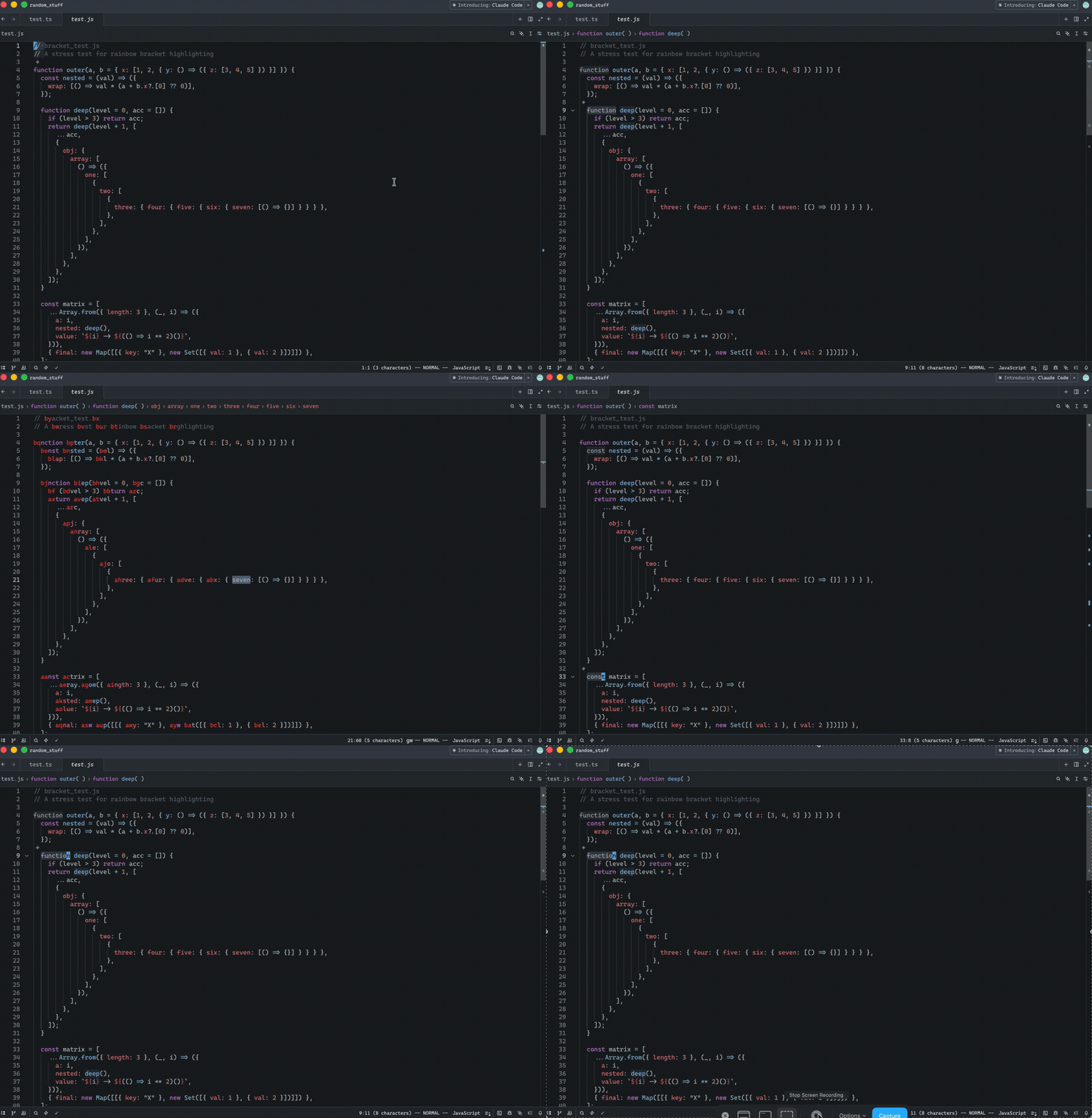 Release Notes: - Added in Helix mode the "amp jump" navigation (`g w`) that displays two-character labels on words for quick cursor navigation. Labels alternate between forward and backward directions from the cursor, prioritizing closer targets with easier-to-type labels. The color of the labels can be controlled via a new `helix.jump_label_accent` setting --------- Co-authored-by: Jakub Konka <kubkon@jakubkonka.com>
Zed


Welcome to Zed, a high-performance, multiplayer code editor from the creators of Atom and Tree-sitter.
Installation
On macOS, Linux, and Windows you can download Zed directly or install Zed via your local package manager (macOS/Linux/Windows).
Other platforms are not yet available:
- Web (tracking issue)
Developing Zed
Contributing
See CONTRIBUTING.md for ways you can contribute to Zed.
Also... we're hiring! Check out our jobs page for open roles.
Licensing
License information for third party dependencies must be correctly provided for CI to pass.
We use cargo-about to automatically comply with open source licenses. If CI is failing, check the following:
- Is it showing a
no license specifiederror for a crate you've created? If so, addpublish = falseunder[package]in your crate's Cargo.toml. - Is the error
failed to satisfy license requirementsfor a dependency? If so, first determine what license the project has and whether this system is sufficient to comply with this license's requirements. If you're unsure, ask a lawyer. Once you've verified that this system is acceptable add the license's SPDX identifier to theacceptedarray inscript/licenses/zed-licenses.toml. - Is
cargo-aboutunable to find the license for a dependency? If so, add a clarification field at the end ofscript/licenses/zed-licenses.toml, as specified in the cargo-about book.
Sponsorship
Zed is developed by Zed Industries, Inc., a for-profit company.
If you’d like to financially support the project, you can do so via GitHub Sponsors. Sponsorships go directly to Zed Industries and are used as general company revenue. There are no perks or entitlements associated with sponsorship.